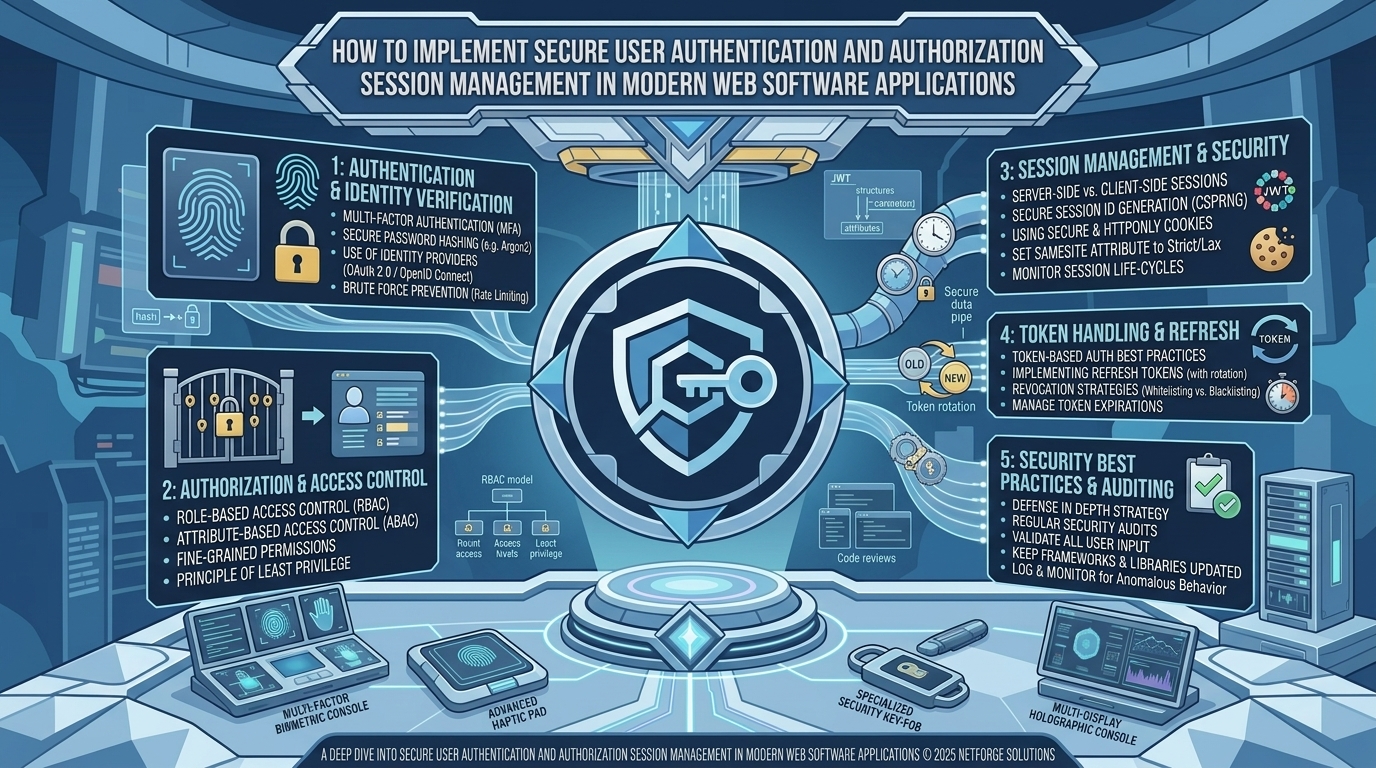
How To Implement Secure User Authentication And Authorization Session Management In Modern Web Software Applications
Introduction
As modern software applications scale across elite technology and enterprise hubs—from the bustling tech corridors of San Francisco, Silicon Valley, and Seattle to enterprise ecosystems in New York, Texas, and Washington—security remains the ultimate foundational pillar of digital trust. Whether powering high-traffic digital storefronts, multi-tenant enterprise tools, or specialized platforms like bestpetstuff.com, safeguarding user data against unauthorized access, session hijacking, and credential theft is non-negotiable.
When authentication and authorization systems are poorly engineered, applications become prime targets for automated credential stuffing, token replay attacks, and privilege escalation vulnerabilities. Building robust, enterprise-grade access control requires mastering modern cryptographic standards, secure cookie attributes, stateless JSON Web Tokens (JWTs), and robust role-based permission boundaries.
This comprehensive guide explores the core architecture, step-by-step implementation blueprints, security tips, and best practices required to implement secure user authentication and authorization session management in modern web software applications.
1. The Architectural Paradigm: Authentication vs. Authorization
Before writing code, development teams must clearly distinguish between the two distinct pillars of access control:
[ User Request With Credentials ]
               │
               ▼
[ Authentication (AuthN) ] ──► Verifies WHO the user is (Credentials / OAuth / Passkeys)
               │
               ▼
[ Authorization (AuthZ) ] ──► Verifies WHAT the user is allowed to DO (RBAC / ABAC)
- Authentication (AuthN): The process of verifying the identity of a user or system entity (e.g., verifying a password hash, validating an OAuth provider token, or checking a multi-factor authentication [MFA] code).
- Authorization (AuthZ): The process of verifying whether an authenticated entity possesses the required permissions to access a specific resource or execute a protected action (e.g., verifying if a standard user can access administrative dashboards).
2. Choosing the Right Session Management Strategy: Cookies vs. Tokens
One of the most consequential architectural decisions in web security is how user sessions are maintained after a successful login.
+-----------------------------------+-----------------------------------+
| Session Management Mechanism      | Security & Architectural Profile  |
+-----------------------------------+-----------------------------------+
| HttpOnly, Secure, SameSite Cookies| Highly secure against Cross-Site  |
| (Server-Side Sessions / JWT)      | Scripting (XSS); handled by browser|
| LocalStorage / SessionStorage     | Vulnerable to XSS token theft;    |
| (Client-Side JWT Storage)         | requires manual header injection  |
+-----------------------------------+-----------------------------------+
- The Dangers of LocalStorage: Storing sensitive access tokens in client-side
localStorageorsessionStorageleaves them completely exposed to malicious JavaScript injected via Cross-Site Scripting (XSS) vulnerabilities. - The Secure Cookie Standard: Modern applications should store authentication tokens inside HttpOnly, Secure, SameSite=Strict cookies. Because
HttpOnlycookies cannot be accessed by client-side JavaScript, they neutralize XSS token exfiltration entirely.
3. Step-by-Step Implementation Blueprint
Step 1: Implementing Secure Password Hashing
Never store plaintext or weakly hashed passwords. Utilize industry-standard key derivation functions like Argon2id or bcrypt with appropriate work factors:
TypeScript
import * as argon2 from "argon2";

// Hashing a password during user registration
export async function hashPassword(plainTextPassword: string): Promise<string> {
  try {
    return await argon2.hash(plainTextPassword, {
      type: argon2.argon2id,
      memoryCost: 65536, // 64 MB
      timeCost: 3,
      parallelism: 4,
    });
  } catch (error) {
    throw new Error("Password hashing failed");
  }
}

// Verifying a password during login
export async function verifyPassword(hash: string, plainTextPassword: string): Promise<boolean> {
  return await argon2.verify(hash, plainTextPassword);
}
Step 2: Issuing HttpOnly Cookie Sessions with JWTs
Upon successful credential validation, issue a cryptographically signed JSON Web Token enclosed within a secure HTTP-only cookie:
TypeScript
import { Response } from "express";
import jwt from "jsonwebtoken";

interface UserPayload {
  userId: string;
  role: string;
}

export function setAuthCookie(res: Response, user: UserPayload): void {
  const token = jwt.sign(user, process.env.JWT_SECRET_KEY!, {
    expiresIn: "15m", // Short-lived access token
  });

  res.cookie("access_token", token, {
    httpOnly: true,
    secure: process.env.NODE_ENV === "production",
    sameSite: "strict",
    maxAge: 15 * 60 * 1000, // 15 minutes
  });
}
4. Best Practices for Enterprise Security and Defense-in-Depth
+-----------------------------------+-----------------------------------+
| Security Layer                    | Implementation Standard           |
+-----------------------------------+-----------------------------------+
| Rate Limiting                     | Prevent brute-force login attacks |
|                                   | using Redis-backed IP/user limits |
| Multi-Factor Authentication (MFA) | Require TOTP or WebAuthn passkeys |
|                                   | for privileged account access     |
| Token Rotation & Revocation       | Invalidate refresh tokens upon    |
|                                   | suspicious reuse or logout events |
+-----------------------------------+-----------------------------------+
- Implement Robust Rate Limiting: Protect your authentication endpoints (
/api/login,/api/password-reset) using distributed rate limiters to block automated credential stuffing and brute-force attacks. - Enforce Principle of Least Privilege: Ensure that backend authorization checks validate permissions on every protected API route, rather than relying solely on client-side route hiding.
Frequently Asked Questions (FAQ)
1. What is the difference between authentication and authorization?
Authentication verifies who a user is, while authorization determines what resources or actions that authenticated user is permitted to access.
2. Why is storing JWTs in localStorage considered a security risk?
localStorage is accessible via JavaScript, meaning any malicious script injected through an XSS vulnerability can steal the token and impersonate the user.
3. What makes HttpOnly cookies safer for session management?
HttpOnly cookies cannot be accessed by client-side JavaScript, rendering them immune to theft via Cross-Site Scripting (XSS) attacks.
4. Why is Argon2id recommended over bcrypt for password hashing?
Argon2id is the winner of the Password Hashing Competition and provides superior resistance against GPU-based brute-force and side-channel cracking attacks.
5. What is the purpose of a short-lived access token paired with a refresh token?
Short-lived access tokens limit the window of vulnerability if intercepted, while refresh tokens securely manage long-lived user sessions behind the scenes.
6. How does rate limiting protect authentication endpoints?
Rate limiting restricts the number of login attempts allowed from a specific IP address or user account within a given timeframe, stopping brute-force attacks.
7. What is Role-Based Access Control (RBAC)?
RBAC is an authorization model that assigns permissions to specific user roles (e.g., Admin, Editor, Customer) rather than individual users, simplifying permission management.
8. What is the role of SameSite cookie attributes?
The SameSite attribute (Strict or Lax) protects applications against Cross-Site Request Forgery (CSRF) attacks by controlling whether cookies are sent with cross-site requests.
9. How do Passkeys and WebAuthn improve modern authentication?
WebAuthn and Passkeys utilize public-key cryptography and biometric verification (like FaceID or fingerprint scanners), eliminating vulnerable passwords entirely.
10. How should an application handle secure user logout?
A secure logout must clear the HttpOnly authentication cookie from the browser, invalidate any active server-side sessions, and blacklist associated refresh tokens in the database.
Conclusion
Implementing secure user authentication and authorization session management in modern web software applications is an essential engineering discipline that safeguards user data and preserves digital trust. By utilizing robust password hashes like Argon2id, storing session credentials in secure HttpOnly cookies, enforcing strict role-based access control, and deploying rate-limiting defenses, development teams can neutralize modern threat vectors. Embracing these comprehensive security best practices guarantees long-term application integrity, compliance, and unshakeable digital resilience across all modern web environments.