Step By Step Guide To Fine-Tuning Open Source LLMs Using Custom Domain-Specific Datasets
Introduction
As organizations across major innovation hubs—from the financial and legal powerhouses of New York and San Francisco to the corporate headquarters of Texas, the tech corridors of Seattle (Washington), and the engineering hubs of California—push the boundaries of artificial intelligence, out-of-the-box foundation models often fall short. While models like Llama, Qwen, and Mistral possess broad general intelligence, they frequently lack the specialized vocabulary, regulatory context, internal product logic, and proprietary nuance required for enterprise-grade deployment.
Relying solely on Retrieval-Augmented Generation (RAG) is not always enough. When your use case requires deep stylistic alignment, complex multi-step reasoning over specialized data structures, or embedding deep domain expertise directly into model weights, fine-tuning is required.
This comprehensive technical guide provides a rigorous, step-by-step framework for fine-tuning open-source Large Language Models (LLMs) using custom, domain-specific datasets while maintaining strict data privacy and computational efficiency.
1. Understanding Fine-Tuning vs. RAG: When Do You Need Parameter Updates?
Before committing compute resources and engineering hours, architects must evaluate whether fine-tuning is the correct architectural choice compared to Retrieval-Augmented Generation.
- Retrieval-Augmented Generation (RAG): Best for dynamic, frequently changing factual knowledge (e.g., product inventories, daily policy updates, customer support logs). RAG acts as an open-book test, fetching external data at runtime.
- Fine-Tuning: Best for altering behavior, tone, output format, reasoning patterns, or embedding static domain-specific jargon and taxonomy directly into the model’s weights. Fine-tuning teaches the model how to talk and think like your industry expert, rather than just what facts exist.
The Hybrid Enterprise Sweet Spot
The most successful enterprise architectures combine both paradigms: fine-tuning open-source models on domain-specific instruction datasets to ensure expert syntax and formatting, paired with RAG pipelines to inject real-time enterprise database facts at inference time.
2. Preparing Your Custom Domain-Specific Dataset
The cardinal rule of machine learning holds true for LLMs: Garbage in, garbage out. The quality, structure, and cleanliness of your training dataset dictate the success of your fine-tuning run far more than hyperparameter tuning.
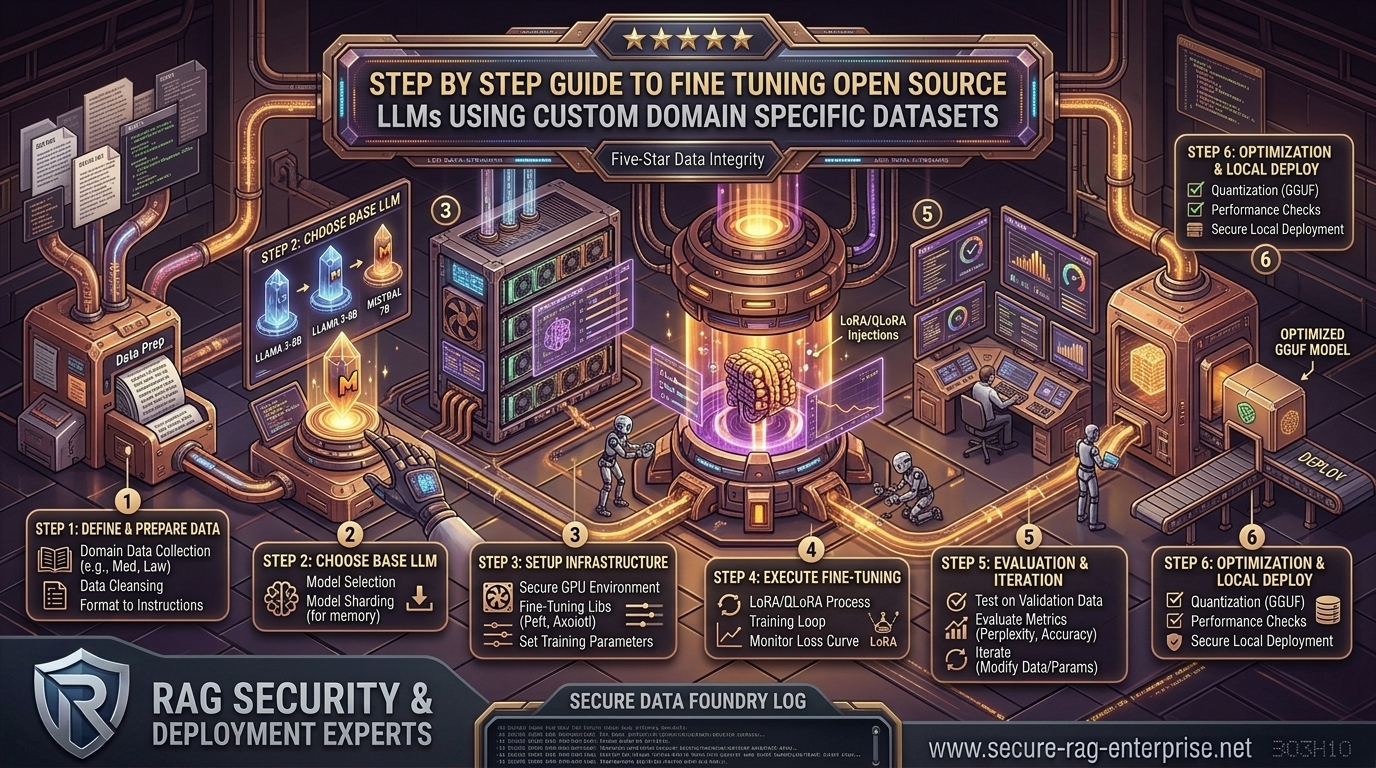
Step 1: Data Collection & Auditing
Gather raw text documents, historical transcripts, API schemas, compliance manuals, and internal documentation from your secure repositories. Ensure all sensitive Personally Identifiable Information (PII) and corporate secrets are aggressively scrubbed unless the model is intended to learn internal identifiers.
Step 2: Formatting into Instruction-Following Pairs
LLMs are typically fine-tuned using supervised fine-tuning (SFT) datasets formatted as conversation turns or instruction-response pairs. Convert your raw documents into structured JSONL (JSON Lines) files matching standard chat templates:
JSON
{"messages": [{"role": "system", "content": "You are a specialized Texas real estate and title compliance assistant."}, {"role": "user", "content": "What are the specific boundary disclosure requirements for commercial properties in Travis County?"}, {"role": "assistant", "content": "Under Travis County commercial real estate guidelines..."}]}
Step 3: Data Quality Control Checklist
- Diversity: Ensure your dataset covers edge cases, error states, and negative examples (teaching the model what not to do).
- Token Length Consistency: Filter out truncated sentences or overly bloated context windows that exceed your model’s maximum sequence length (e.g., 4096 or 8192 tokens).
- Train/Validation Split: Randomly partition your dataset, reserving 90% for training and 10% for validation to monitor evaluation loss and prevent catastrophic overfitting.
3. Selecting the Right Hardware and Open-Source Base Model
Fine-tuning full multi-billion parameter models requires massive cluster infrastructure. However, modern Parameter-Efficient Fine-Tuning (PEFT) techniques allow engineers to fine-tune production-grade models on single workstation GPUs.
Choosing Your Base Model
- Qwen3 Series: Exceptional multilingual and coding capabilities, making it ideal for technical domain adaptation.
- Llama 3/3.1/3.2: Robust baseline performance across general reasoning, broad ecosystem compatibility, and permissive open-weights licensing.
- Mistral / Codestral: Highly efficient dense architectures optimized for rapid execution and specialized syntax generation.
Hardware Requirements for Fine-Tuning
Using 4-bit Quantized Low-Rank Adaptation (QLoRA), approximate VRAM footprints scale efficiently:
- 7B–9B Parameter Models: Requires ~16 GB to 24 GB VRAM (Viable on a single NVIDIA RTX 3090 / 4090 or Apple Silicon Mac).
- 27B–33B Parameter Models: Requires ~48 GB VRAM (Viable on an enterprise A100 / H100 GPU or multi-GPU workstation).
- 70B+ Parameter Models: Requires distributed multi-GPU nodes (2x to 8x A100/H100 clusters).
4. Step-by-Step Implementation: Fine-Tuning with QLoRA
Below is an engineering blueprint utilizing Python, Hugging Face transformers, peft, trl (Transformer Reinforcement Learning), and bitsandbytes to execute a memory-efficient QLoRA fine-tuning run.
Step 1: Install Dependencies
Bash
pip install torch transformers datasets peft trl bitsandbytes accelerate
Step 2: Configure the QLoRA Training Script (train.py)
Python
import torch
from datasets import load_dataset
from transformers import (
    AutoModelForCausalLM,
    AutoTokenizer,
    BitsAndBytesConfig,
    TrainingArguments,
)
from peft import LoraConfig, get_peft_model, prepare_model_for_kbit_training
from trl import SFTTrainer

# 1. Load Dataset
dataset_path = "path_to_your_domain_data.jsonl"
dataset = load_dataset("json", data_files=dataset_path, split="train")

# 2. Model & Tokenizer Initialization
model_id = "Qwen/Qwen3-8B"  # Example open-source base model
tokenizer = AutoTokenizer.from_pretrained(model_id, trust_remote_code=True)
tokenizer.pad_token = tokenizer.eos_token
tokenizer.padding_side = "right"

# 3. Quantization Configuration (QLoRA 4-bit)
bnb_config = BitsAndBytesConfig(
    load_in_4bit=True,
    bnb_4bit_quant_type="nf4",
    bnb_4bit_compute_dtype=torch.bfloat16,
    bnb_4bit_use_double_quant=True,
)

model = AutoModelForCausalLM.from_pretrained(
    model_id,
    quantization_config=bnb_config,
    device_map="auto",
    trust_remote_code=True
)

model = prepare_model_for_kbit_training(model)

# 4. LoRA Hyperparameter Configuration
peft_config = LoraConfig(
    r=16,                       # Rank dimension
    lora_alpha=32,              # Scaling parameter
    target_modules=["q_proj", "k_proj", "v_proj", "o_proj", "gate_proj", "up_proj", "down_proj"],
    lora_dropout=0.05,
    bias="none",
    task_type="CAUSAL_LM"
)

# 5. Training Arguments
training_args = TrainingArguments(
    output_dir="./domain_adapter_output",
    per_device_train_batch_size=4,
    gradient_accumulation_steps=4,
    learning_rate=2e-4,
    logging_steps=10,
    num_train_epochs=3,
    max_steps=-1,
    save_strategy="epoch",
    fp16=False,
    bf16=True,                  # Use bfloat16 for modern NVIDIA GPUs
    optim="paged_adamw_8bit"
)

# 6. Trainer Initialization & Execution
trainer = SFTTrainer(
    model=model,
    train_dataset=dataset,
    peft_config=peft_config,
    max_seq_length=4096,
    tokenizer=tokenizer,
    args=training_args,
)

trainer.train()

# Save adapter weights securely
trainer.model.save_pretrained("./final_domain_adapter")
tokenizer.save_pretrained("./final_domain_adapter")
5. Evaluating and Validating Your Fine-Tuned Model
Never push a newly fine-tuned model straight to production without rigorous evaluation. Model degradation (catastrophic forgetting) can occur, where the model loses its general logic while absorbing your domain data.
- Validation Loss Tracking: Monitor your training vs. validation loss curves. If training loss plummets while validation loss begins to rise, your model is overfitting.
- Benchmark Prompt Testing: Create a holdout test suite of 50 challenging domain-specific questions. Grade the responses against baseline open models and human subject-matter experts (SMEs).
- Regression Testing: Run standardized general reasoning benchmarks (such as MMLU or GSM8K) to ensure the model hasn’t suffered catastrophic forgetting on fundamental reasoning tasks.
6. Merging Weights and Deploying to Production
Once your LoRA adapters are validated, merge them back into the base model weights for optimized inference latency, or serve the base model alongside the dynamic adapter weights using high-performance serving runtimes like vLLM.
Python
from transformers import AutoModelForCausalLM
from peft import PeftModel
import torch

base_model = AutoModelForCausalLM.from_pretrained(
    "Qwen/Qwen3-8B",
    torch_dtype=torch.bfloat16,
    device_map="auto"
)
model = PeftModel.from_pretrained(base_model, "./final_domain_adapter")

# Merge adapter weights into base model
merged_model = model.merge_and_unload()
merged_model.save_pretrained("./production_merged_model")
7. Key Best Practices for Enterprise Fine-Tuning
- Start Small: Begin with a curated, high-quality subset of 1,000 to 5,000 instruction pairs rather than dumping millions of raw lines of text into an unrefined training job.
- Iterate on Learning Rates: If training collapses or generates gibberish tokens, adjust your learning rate downward (e.g., from
2e-4to1e-5). - Version Control Your Datasets: Treat your training datasets like code. Track them using Git LFS or DVC (Data Version Control) to reproduce training runs accurately.
- Maintain Guardrails: Even after fine-tuning, implement input/output safety guardrails to catch hallucinations, toxic outputs, or accidental data leaks.
8. Frequently Asked Questions (FAQ)
1. What is the difference between full fine-tuning and QLoRA?
Full fine-tuning updates every single parameter weight in a model, requiring massive multi-GPU cluster memory. QLoRA (Quantized Low-Rank Adaptation) freezes the base model in 4-bit precision and trains small, lightweight adapter matrices, reducing memory usage by up to 75% while achieving near-identical performance.
2. How many training examples do I need to fine-tune an open-source LLM?
For stylistic alignment or specialized syntax formatting, you can achieve noticeable results with as few as 500 to 1,000 high-quality instruction pairs. For complex domain reasoning and deep vocabulary adaptation, datasets ranging from 5,000 to 50,000 curated pairs are typical.
3. What is “catastrophic forgetting,” and how do I prevent it?
Catastrophic forgetting occurs when a model over-adapts to a narrow custom dataset and loses its broader general reasoning capabilities. To prevent this, mix a small percentage of general instruction data (e.g., open-source general conversational datasets) into your custom training dataset.
4. Can I fine-tune a model locally on my own laptop or workstation?
Yes, if you use QLoRA quantization and target smaller parameter models (such as 7B to 9B models) on a workstation equipped with a modern NVIDIA GPU (like an RTX 3090 or 4090) or unified Apple Silicon memory.
5. Should I use fine-tuning or RAG for my enterprise data?
Use RAG when your data changes frequently (e.g., daily documents, inventory lists, real-time databases) and requires exact source citations. Use fine-tuning when you need to teach the model a specific tone, strict formatting structure, or specialized industry taxonomy that rarely changes.
6. What file format is best for structuring fine-tuning datasets?
JSONL (JSON Lines) is the industry standard format. Each line represents a self-contained JSON object containing structured conversation turns, typically utilizing system, user, and assistant message roles.
7. How do I know if my fine-tuning run was successful?
Evaluate your model using a dual approach: track validation loss curves during training to ensure steady convergence without overfitting, and run a gold-standard qualitative test suite graded by human domain experts.
8. What hyperparameter has the biggest impact on fine-tuning quality?
The learning rate is generally the most sensitive hyperparameter. If it is set too high, training will diverge and output corrupted text; if it is set too low, the model will fail to learn the custom domain nuances.
9. Can I merge my LoRA adapters back into the original base model?
Yes. Once training and validation are complete, you can use Hugging Face PEFT utilities to merge the lightweight adapter weights directly back into the base model parameters for clean, single-artifact production deployment.
10. Are there commercial licensing restrictions when fine-tuning open-source models?
It depends entirely on the base model’s license agreement. Models released under permissive licenses like Apache 2.0 or the MIT License grant full freedom to fine-tune, modify, and deploy commercially. Always review the specific model provider terms before enterprise deployment.
Conclusion
Fine-tuning open-source Large Language Models using custom domain-specific datasets empowers engineering teams to transition from generic AI assistants to deeply specialized, highly accurate enterprise systems. By mastering data preparation, leveraging memory-efficient QLoRA techniques, and executing disciplined validation loops, organizations can build custom AI infrastructure that speaks their exact language while maintaining absolute data security.